A new release of RedDiamond, version 3.6.4, has been released. You can find AppImage, RPM, and Debian packages here. For those of you unfamiliar with this OpenSource project, it really started off as part of the How Far We’ve Come series. These dovetailed into the CopperSpice Experiments series.
Having come up on real operating systems with editors like EDT, I have always been annoyed at how futile most PC based programming editors are. They pack in dozens of conflicting plugins chasing “features” and skimp on the most basic of all functionality. Despite it having existed long before the PC, nearly every PC text editor lacks the core functionality of EDT. One notable exception is GNU Emacs, which has an EDT emulation package. That would also be why I have a new book coming out covering EDT emulation in Emacs.
The Keypad

Long before we had a mouse (or even arrow keys) we had Efficiency Experts (later called Systems Analysts) which had many millions (probably billions in today’s dollars) of studies to back them up. Those studies were about the increased productivity of keeping hands over “home row” and grouping keypad activities over other areas such as the keypad. It is how all data entry screens and paper forms were designed. You will still see it today in shops practicing true Software Engineering and embracing Best Practices.
Shit shops have combo boxes scattered everywhere. This forces users to be constantly bouncing between mouse, keyboard, and keypad. On better UI libraries you can expand the combo box by hitting the space bar when in it. Best UI libraries (most of today’s aren’t) have progressive typing where each char you type becomes part of the filter string used to trim entries in the list below until you tab or there is only one matching entry.
Fixes and Features
* upgraded to C++17 coding for classes. Initializers, std::optional, etc.
* added null lexer syntax record so we can set default theme.
* fixed syntax dialog so correct theme displays.
* fixed Syntax dialog for COBOL shows "COBALT" but it uses Classic because none defined so should show Classic
* fixed tab text turning red for buffer that needs saving.
* fixed list of lexers in combo box as well as SYNTAX_MASTER table.
* fixed instead of erroring out if we cannot open read/write, open read-only, set indicator and notify.
* Updated Help to inform "null" is default syntax.
* added "Find in Files" to right click menu if on word or has selection
* added Post to GitHub Gist to right click menu enabled with active selection
* added Post to GitHub Gist command
* added Post to GitHub Gist to tab right click menu
* added setters for each of the fields in dialogGist so it could be used from other places and more robust.
* added green text for RO and tab text of read only tabs.
* added wav file beep sound for errors
* fixed connected up trashcan buttons for theme colors
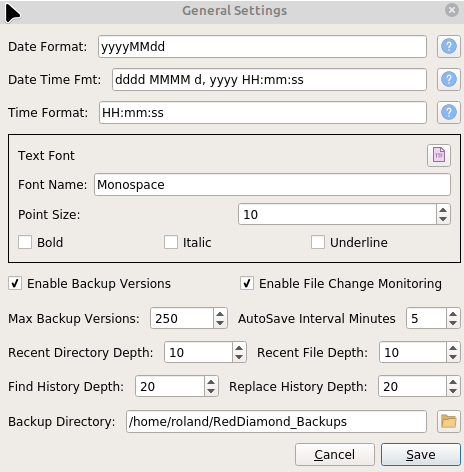
* fixed missing font chooser on General tab.
* added support for EDGE_COLOR as a style
* added saving of element and indicator default values before loading anything so we can properly clear/reset when changing themes.
* fixed save/clear EDGE style when changing themes
* fixed Not on file needs to be erased when saving element
* fixed theme names now sorted in combobox on syntax dialog
* added Copy button to Theme dialog which will copy current theme to a new name
* updated edt help for new commands and GOLD key functions
* added Indicator Delete button
* added Element Delete button
* fixed Indicator tab is not resetting fields to defaults when record not found on database.
* fixed bug with TOP and some other commands weren't clearing LastCommand so prompt remained "active"
* exported new theme files
* updated themes in database and changed default themes: cpp   COBALT   null  Fred   cmake  YABU
* fixed now save last theme export directory and set dialog there
* LexRuby.cxx added back in.
* fixed GIST command options
* finished adding file monitoring (QFileSystemWatcher) for changes/reload from disk prompt when changed on disk
* fixed filter out empty paths when adding to file watcher.
* fixed saving file needs to disable file monitoring and re-add so we don't get asked to reload immedialtely after save.
* added User can turn off automatic reloading of externally modified documents in settings.
* fixed reload dialog needs to show file name because it may not be current tab.
* fixed restarting with a buffer doesn't flag the buffer as needing save - might be due to not being visible
* fixed reload needs to remove watched file before loading again due to add failure
* added Documents can be manually reloaded from disk.
* added Allow PF3 in prompt line when entering search text, have it function like ENTER
* updated help text for <Ctrl>-Click on email address/URL opening default app
* fixed file passed on command line not opening bug so RedDiamond works opening file from right-click menu in file manager.
* fixed if RedDiamond running and someone tries to open via right-click on a file need to pass the name to running instance without throwing up error dialog. Possibly need to avoid the splash screen as well.
* fixed Overlord constructor needs to load available lexers from database.
* fixed subs bug where SUBS|ui->|m_ui->|rest goes into infinite loop. After replace we need to move the cursor the length of the replacement otherwise we cannot get past the first replacement
Summary
Since most of you won’t read that.
If you have GitHub and create a Gist token for your account then add it in the settings, you can use Gist directly from within RedDiamond.
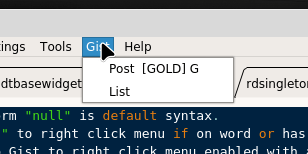
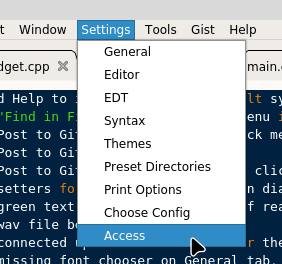
You enter your code under the Access menu.
There is now a copy button on the theme tab which lets you copy an existing theme to a new theme name for modification.

Don’t go overboard making themes until after a future release with spell check, auto complete and a couple other features requiring additional indicators gets released.
There is now file change monitoring support for those who like it. You can turn it off too. Button to change the font is now back on the settings menu as well.
<Ctrl>-click on email address will open default email application. Same on URL will open default browser application.
Other bug fixes and minor features.