You just finished installing Debian 13 on your latest computer and at first boot the system tosses up an error message about “No shim_lock.” Yeah, it sucks. What sucks worse is all the “advice” you find online for work arounds. Other distros may have polished this particular turd. Secure boot is basically there to stop you from installing anything other than a Microsoft product. Despite all claims to the contrary this seems to be the case.
B550M
For those lucky enough to be using a B550M based motherboard, this is how you fix it. No need to panic, just do a cold boot. As soon as the splash screen comes up hit the DEL key. Keep hitting it every half to full second until it tells you it is entering the BIOS. You with other boards have to search for the proper key sequence and process of accessing the mobo BIOS.
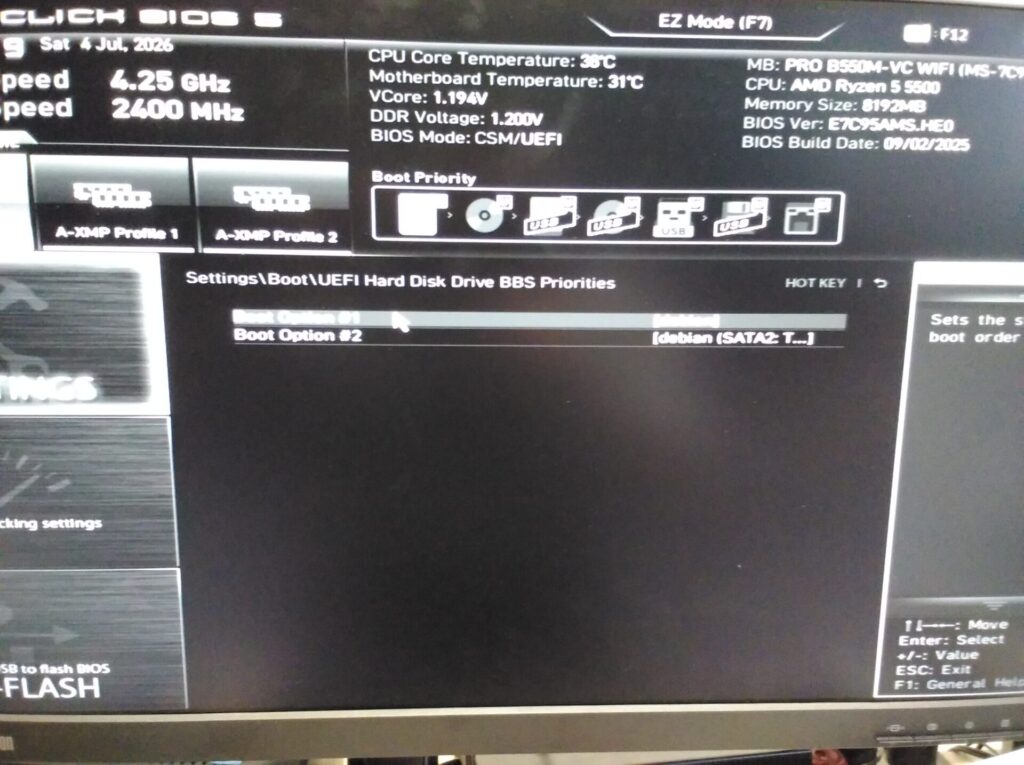
Navigate to Settings\Boot\UEFI Hard Disk Drive BBS Priorities as shown above. There will be two entries (more if you have additional operating systems installed.) The one that is current and giving you the no shim_lock error will be the second one. Debian pointing to a SATA drive for legacy boot. Make the one that just says [debian] Boot Option #1. Exit, save, reboot.
Roland Hughes started his IT career in the early 1980s. He quickly became a consultant and president of Logikal Solutions, a software consulting firm specializing in OpenVMS application and C++/Qt touchscreen/embedded Linux development. Early in his career he became involved in what is now called cross platform development. Given the dearth of useful books on the subject he ventured into the world of professional author in 1995 writing the first of the "Zinc It!" book series for John Gordon Burke Publisher, Inc.
A decade later he released a massive (nearly 800 pages) tome "The Minimum You Need to Know to Be an OpenVMS Application Developer" which tried to encapsulate the essential skills gained over what was nearly a 20 year career at that point. From there "The Minimum You Need to Know" book series was born.
Three years later he wrote his first novel "Infinite Exposure" which got much notice from people involved in the banking and financial security worlds. Some of the attacks predicted in that book have since come to pass. While it was not originally intended to be a trilogy, it became the first book of "The Earth That Was" trilogy:
Infinite Exposure
Lesedi - The Greatest Lie Ever Told
John Smith - Last Known Survivor of the Microsoft Wars
When he is not consulting Roland Hughes posts about technology and sometimes politics on his blog. He also has regularly scheduled Sunday posts appearing on the Interesting Authors blog.