I found Xmake looking to replace CMake scripts that CopperSpice used. I mean, when one has to use three different search engines to look up a function before you can find it . . . Then you are told it is undocumented for internal use only . . . Not something one wants to see in production code!
Regular readers have seen me write about CopperSpice, CMake, and general hacks found in legacy toolchains. CMake is immensely convoluted and seriously bloated. I tried VCPKG but it came up short. Well, it came up immensely short in platform support. It has the classic Microsoft problem – only wanting to support what built and shipped 15 minutes ago. When I tried to support Ubuntu 18.04 vcpkg failed spectacularly. Nothing in the repos went back that far.
In the medical device world we can have twenty-plus year hermetically sealed development environments. It’s only been like the last five years that Harman stopped calling about a medical device for heart patients using OS/2 and Qt 3.x. Once you get through your FDA 510K you avoid another one at all costs.
Broad hardware and OS support
I don’t read or do much Lua programming. It seems to be kind of “everywhere” and nowhere. I mean it is part of the Scintilla library that is the core for a long list of editors. Just visit this Xmake page and check out the long list of supported operating systems and CPUs. They even support i386 Linux. When I asked I was told they actively support Windows 7.
Laugh all you want. There are hospitals and doctor offices running Windows XP. Upgrading the desktop OS for your medical records system is high risk in the ER. You have very little warning when a cart with a patient will be crashing through the door.
hello_glib.cpp
Everybody needs a “hello world!”.
#include <iostream>
#include <glib.h>

int main(int argc, char** argv)
{
     GString *str1 = g_string_new("Hello world!");

     std::cout << str1->str << std::endl;

     g_string_free( str1, TRUE);
     return 0;
}Yes, more work than it needs to be, but eventually BasisDoctrina will be using SDL3 which uses Glib. Well, technically the baby steps I have coded now use them, but I want to dump CMake before I get painted into a corner. I’m also very excited about the XPack part of Xmake. Debian and RPM packages “automatically” or so the pitch is.
xmake.lua
One trend in today’s, well, really even yesterday’s packaging tools is needing a hard coded file name. Xmake at least gives you a way around this.
add_rules("mode.debug", "mode.release")

set_languages("c++17", "c11")

add_requires("glib", {configs = {shared = true}})

target("h_g")
    set_kind("binary")
    add_files("*.cpp")
    add_packages("glib")
You have decisions to make here. I did the straight forward add_requires() and add_packages(). The first comes into play when your project is being configured. The second is tied to the target itself. I wanted to dump maintaining dependency.sh scripts to install a whack-a-mole listed of dependencies.
Check out the doc for add_requires() because you can turn off checking for system installed versions. Don’t trust any AI generated answers about xmake’s system = false in your dependency line. Here is a snippet from the official doc.
package("myzlib")
     set_base("zlib")
     set_urls("https://github.com/madler/zlib.git")
package_end()

add_requires("myzlib", {system = false, alias = "zlib"})

target("test")
     set_kind("binary")
     add_files("src/*.c")
     add_packages("zlib")
If you don’t override with your own package it will look in Xrepo for the dependency.
Word of caution!
Xmake supports using CMake, Vcpkg and other things. When things aren’t in Xrepo it will go looking in the other package managers it knows about. Always use the browser interface to search the package repo before you ASS-U-ME “it’s in there.” You can put yourself in a world of hurt if, say, it was pulling from Vcpkg repos, but had network issue so pulled a completely different version from CMake packages.
Building
If you just cd to your project root and type xmake then hit return, xmake will pollute your source tree. It will create a build directory tree and a .xmake directory tree. Y’all know what happens. Nobody adds these to the gitignore list so now you have a shit-ton of binaries and build artifacts uploaded to your text based code management system.
Personally I cannot understand this younger generation’s fascination with building in the project source tree. It is a recipe for catastrophe. Even NanoGUI does this. I love NanoGUI, but, come on guys!
#
echo "MUST BE RUN FROM ROOT OF PROJECT DIRECTORY TREE"
echo " "
echo "This will delete existing local build or release "
echo "directories and create new ones. It will then prep "
echo "the build directory for a ninja build. Finally it "
echo "will perform the actual build."

TIME_STARTED=$( date '+%F_%H:%M:%S' )

#  Step 1 : Establish fresh clean directories
#
# xmake has bug where it cannot expand directory paths.
#
echo "*** Establishing fresh directories"
SCRIPT_DIR="$PWD"
BUILD_DIR=$(readlink -m "$SCRIPT_DIR/../h_g_local_build")
RELEASE_DIR=$(readlink -m "$SCRIPT_DIR/../h_g_local_release")

echo "SCRIPT_DIR        $SCRIPT_DIR"
echo "BUILD_DIR         $BUILD_DIR"
echo "RELEASE_DIR       $RELEASE_DIR"

#  Step 2 : Fresh directories
#
if [ -d "$BUILD_DIR" ]; then
   rm -rf "$BUILD_DIR"
fi

if [ -d "$RELEASE_DIR" ]; then
   rm -rf "$RELEASE_DIR"
fi

#  create the directories we will use so they are fresh and clean
#
mkdir -p "$BUILD_DIR"
mkdir -p "$RELEASE_DIR"

#

#  Step 3 : configure build
#
cd "$BUILD_DIR"

CORES=$(lscpu -b -p=Core,Socket | grep -v '^#' | sort -u | wc -l)
JOBS=$((CORES-1))

echo "Found $CORES cores so setting job count to $JOBS"


# if you want to see verbose debug information add -vD to this line.
# Yes, vd is an incredibly poor choice.
#
CONFIG_STARTED=$( date '+%F_%H:%M:%S' )
xmake config --yes --file="$SCRIPT_DIR/xmake.lua" -P "$BUILD_DIR" -o "$RELEASE_DIR"
CONFIG_COMPLETED=$( date '+%F_%H:%M:%S' )

# Step 4 : Build and install
echo "*** Building h_g Local"

BUILD_STARTED=$( date '+%F_%H:%M:%S' )
xmake --jobs=$JOBS
BUILD_COMPLETED=$( date '+%F_%H:%M:%S' )
Xmake has a list of supported environment variables. Never set them. I spent days slamming my head against the keyboard trying to use XMAKE_PKG_CACHEDIR. The code in Xmake which checks for dependency dependencies doesn’t honor that variable. If I just did xmake from the command line my project built and ran. If I had this shell script pointing to a different directory for cache it failed trying to retrieve and build glib. None of the glib dependencies were downloaded into that new cache. It couldn’t find any header files it needed to compile.
First build
Your first build will take a long time if you have a big dependency like glib. One real downside (which I reported) is the xmake config step does not have –jobs=N. That’s where the mother-humping workload is and it defaults to maxing out your machine.
Secondary builds run like this
developer@u24mateDell:~/sf_projects/hello_glib$ ./build_h_g.sh
MUST BE RUN FROM ROOT OF PROJECT DIRECTORY TREE

This will delete existing local build or release
directories and create new ones. It will then prep
the build directory for a ninja build. Finally it
will perform the actual build.
*** Establishing fresh directories
SCRIPT_DIR        /home/developer/sf_projects/hello_glib
BUILD_DIR         /home/developer/sf_projects/h_g_local_build
RELEASE_DIR       /home/developer/sf_projects/h_g_local_release
Found 5 cores so setting job count to 4
checking for platform ... linux (x86_64)
*** Building h_g Local
[ 23%]: <h_g> cache compiling.release hello_glib.cpp
[ 47%]: <h_g> linking.release h_g
[100%]: build ok, spent 0.591s
developer@u24mateDell:~/sf_projects/hello_glib$
Summary
Xmake is a massive improvement for project building and packaging. CMake and other legacy build environments have gotten so bloated and cumbersome that we all have to move to something with more up front architecture.
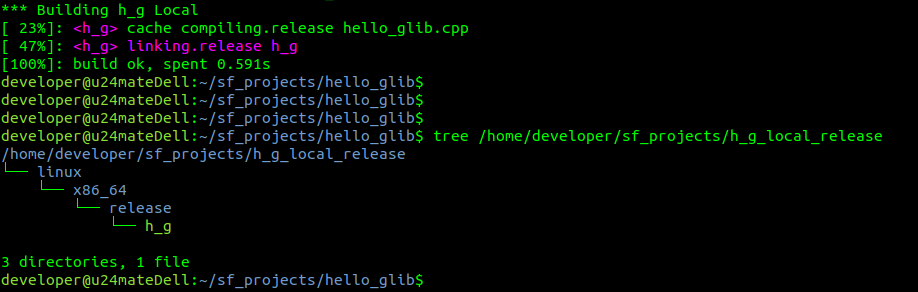

Note the very nice directory structure. This supports debug and release for every architecture you are compiling for. They didn’t leave it up to you to figure out. You just have to find where they put it.