Manjaro is one of the better Arch based Linux distributions, but it has notorious frustrations with Samba. The latest rounds of frustration come from the fact they should have never supported Ubuntu Snaps. Snaps are insecure. Because of that insecurity Manjaro had to add apparmor. That gets us back to the classic issue with Manjaro. Developers behind the distro always view conflicts between packages as “someone else’s problem.”
Creating Your Share
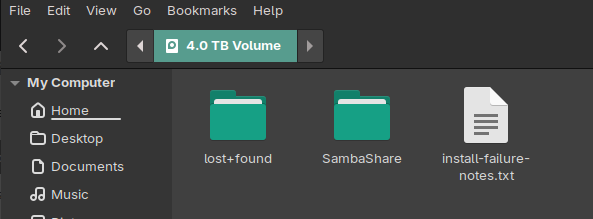
I had a spare 4TB drive (left over from my TNAS upgrade to 14TB drives, so it is old with a lot of miles on it) that I stuck in this HP EliteDesk i7-gen6 machine. I created a share out there just to have a place to park extra backup copies of the sequel for this book.

So, the first part is easy.
Most Distros Suck at Multiple Drives
This reality adds to the frustration most end users have with Linux. A segment of “the community” deemed it dangerous for Linux distros to just work out of the box. Why, there could be a virus or something on those other drives. We can’t just add them to FSTAB so they automount! Isn’t every Linux user editing and building their own kernel every week?
Quit listening to all of those so-called experts telling you not to use /mnt. That’s what it is there for.
sudo mkdir /mnt/Data
sudo chown roland:roland /mnt/Data
sudo chmod g+rwx /mnt/Data
sudo chmod a+rwx /mnt/DataHey, this is my machine. I’m the only one that works in the office. I don’t want to chase my tail over permissions issues when I’m only storing daily backup copies of a book or four I’m writing. Nuclear launch codes would be a different matter. What I didn’t tell you up front was the 4TB drive already had the Samba share and files. This machine was previously running CachyOS until an “update” from CachyOS royally pooched the system. I needed a slightly more nuclear approach to things.
sudo chown -R roland:roland /mnt/Data
sudo chmod -R 755 /mnt/Data/SambaShareNow, you have to either be a command line grunt or have installed Gnome Disks.
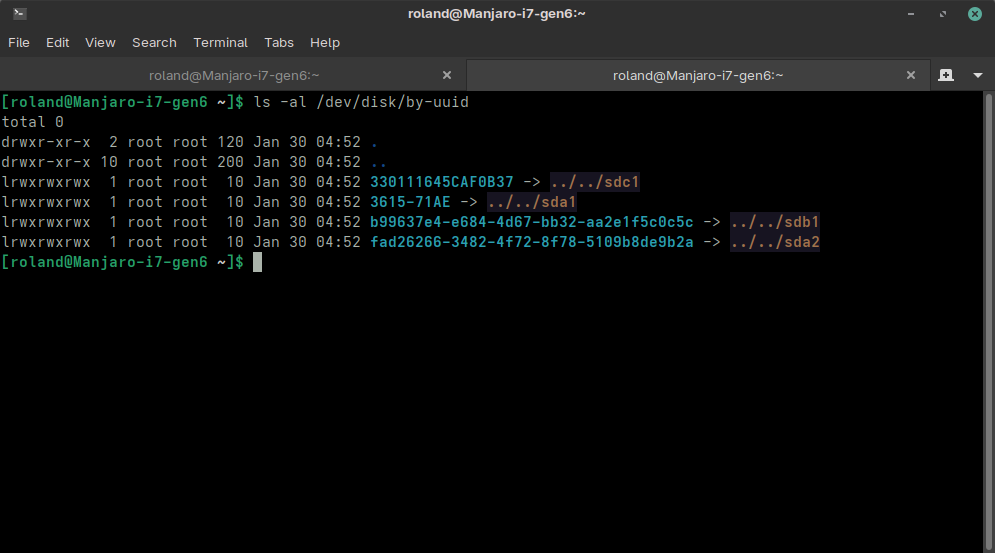
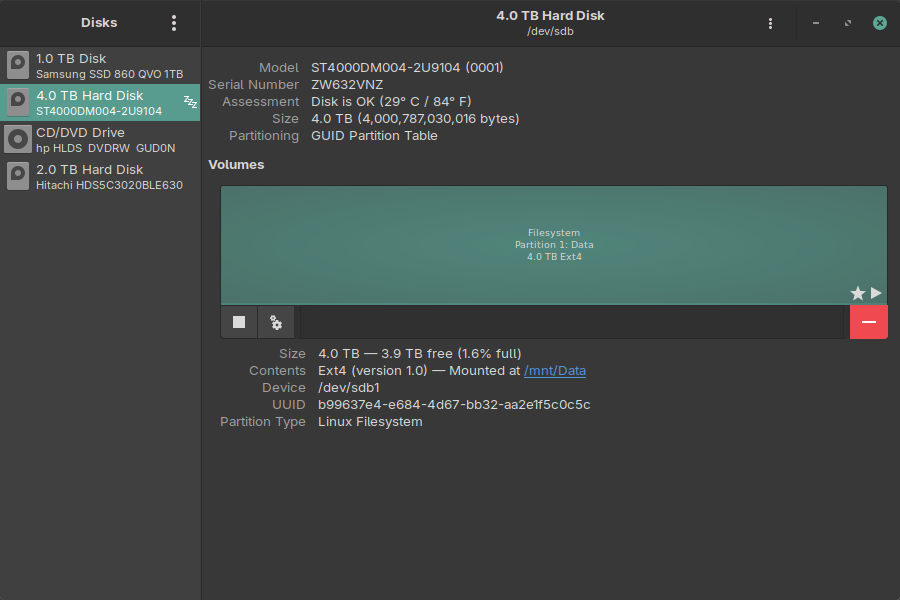
The command line grunt has to know what /dev designation goes with what drive. With Gnome Disks you don’t. What you want is the UUID found near the bottom of the above image for the “extra” drive.
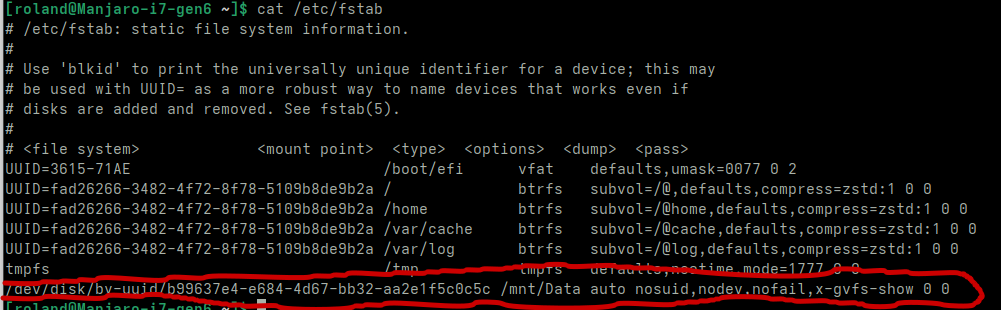
Note the last line of fstab. I manually added it via
sudo nano /etc/fstabYou need everything after /mnt/Data assuming you created /mnt/Data as your mount point.
/dev/disk/by-uuid/b99637e4-e684-4d67-bb32-aa2e1f5c0c5c /mnt/Data auto nosuid,nodev,nofail,x-gvfs-show 0 0You can use either UUID= with the id or you can use the full path as I did. Both work. Do not forget the x-gvfs-show at the end. That’s what lets it show up in your file managers.
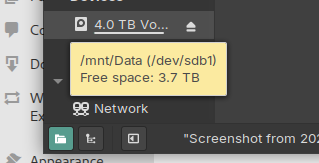
Before you reboot
sudo pacman -Syu smbclient gvfs gvfs-smb samba --needed
sudo modprobe cifs
hostnamectlIf cifs isn’t installed you need to install it as well. Make certain your static hostname is 15 characters or less.
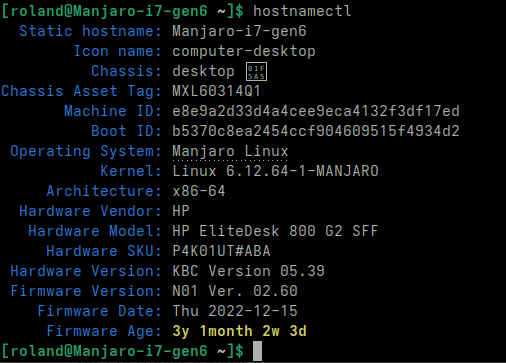
Otherwise you will get a warning when you test your Samba configuration because Windows duth sucketh at networking. To fix it
sudo hostnamectl set-hostname Manjaro-i7-gen6
sudo nano /etc/hostsOf course, use your own hostname. Then you have to fix it in /etc/hosts as well.
The .conf
sudo nano /etc/samba/smb.confAdd a section much like below.
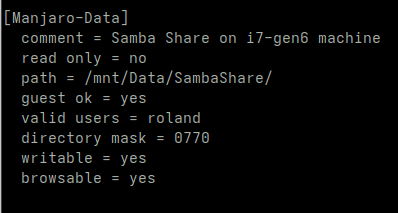
The externally visible name of your share goes in []. Do not forget to edit valid users adding the username(s) you wish to have access. If your username isn’t in that list you cannot access. Exit and save.
sudo testparm /etc/samba/smb.confIf you pooched anything in a really bad way the above test will tell you.
Firewall
Manjaro pretty much demands you run a firewall with Samba.
sudo pacman -Syu firewalld
sudo systemctl enable --now firewalld
ip address
nmcli device show | grep IP4.ROUTE
sudo firewall-cmd --permanent --zone="home" --list-services
sudo firewall-cmd --permanent --zone="public" --list-services
sudo firewall-cmd --permanent --zone="home" --add-source="10.0.0.0/24"
sudo firewall-cmd --permanent --zone="home" --add-service="samba"How intuitive!
You get the IP address to use for source in line 7 from the oh so self-explanatory line 4.
Samba will not work properly without avhi.
systemctl enable avahi-daemon.service avahi-daemon.socket avahi-dnsconfd
# later versions of Manjaro do not auto enable/start the packages
sudo systemctl enable --now smb nmb
sudo systemctl start smb nmb
sudo systemctl status smb nmb
You are not a user yet
Probably need to reboot at this point. I don’t remember how many times and places I rebooted.
sudo groupadd -r sambashare
sudo gpasswd sambashare -a roland
sudo smbpasswd -a rolandSamba server has its own user and password database. Your local machine account may be Fred, but you could choose to access the Samba share as Ethyl. Whatever sparks your powder.
Reboot now and try to map your share from a Windows computer.
I don’t have access privileges
Yeah. Depending on the version of Manjaro you are using, you can’t get there from here. You can find the service but Windows gags trying to display the contents. This is a problem caused by the
Nah ma yob man
mentality of the distro developers. Other distros realize apparmor is a serious monkey wrench in the gears of life. They include scripts to configure apparmor if Samba server is installed. Nah ma yob man. You will spend days chasing your tail trying to fix the permissions. Most users switch to a different distro at this point. You installed Manjaro so you could surf the web and check email without Microsoft’s constant privacy invasion; you don’t have any desire to work on the Linux kernel, write device drivers, or develop low level firmware. You choose to move on.
The inexcusable decision to allow Unbuntu snaps to run on Manjaro is what screwed this pooch. The gaping security issues with snaps mandates the use of apparmor.
sudo nano /etc/apparmor.d/usr.sbin.smbdUnderneath the HOMEDIRS line add two lines with the full path to your Samba share directory.
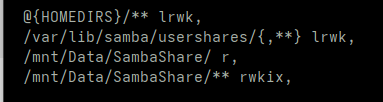
sudo aa-enforce /usr/sbin/smbd
sudo apparmor_parser -r /etc/apparmor.d/usr.sbin.smbd
sudo aa-statusYou should be able to connect now. Most likely have to delete the previous mapping attempt though.